Mail checker: an n8n workflow that texts me what matters
Gmail → LLM → Telegram. Twenty minutes of n8n, one trigger, and I never stare at an inbox again.
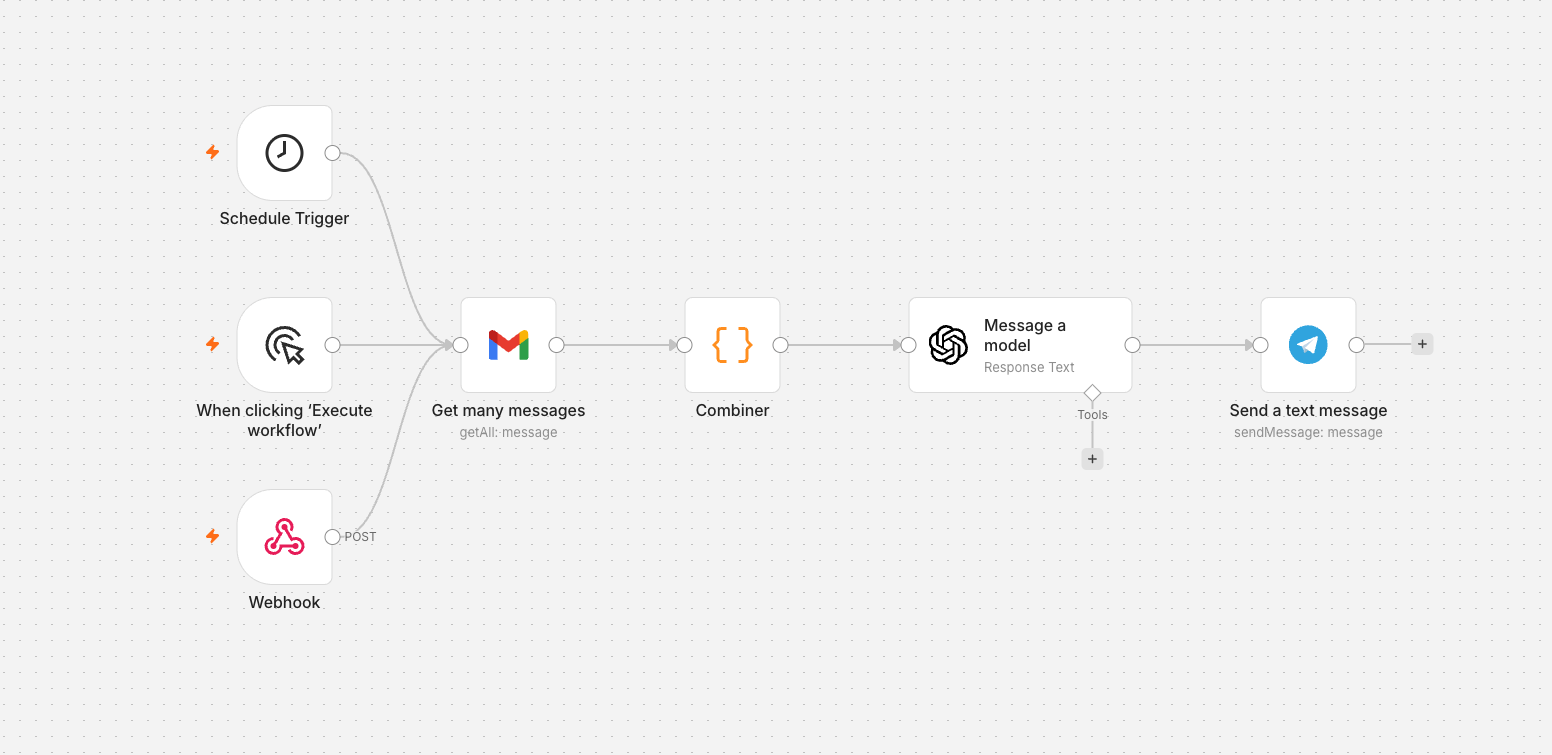
The inbox is a firehose. I don’t want to read it — I want to know when something needs me. So I built a small n8n workflow that reads my Gmail on a schedule, asks a model to summarise only what matters, and pings me on Telegram. Total build time was about twenty minutes, and I genuinely forget it’s running. That’s the highest compliment a workflow can earn.
What the flow actually does
The workflow has three entry points, though only two of them do anything. The Schedule Trigger fires every fifteen minutes during work hours; that’s the one doing the real work. The Manual node is there for iterating on the prompt. The Webhook is wired in but disconnected, kept around because the day I want some other tool to kick the workflow I’ll be glad it’s there.
From the trigger, the path is short. A Gmail node grabs everything unread. A Combiner flattens the array of messages into a single text blob. An OpenAI node reads that blob with a system prompt that says, in effect, summarise anything that needs a human reply, ignore the rest, keep it under 200 words. A Telegram node ships the result to my phone.
Six connected nodes. One prompt. One schedule. That’s the whole thing.
The Combiner is the load-bearing piece
The first version of this workflow didn’t have the Combiner. The Gmail node would return five unread emails and the OpenAI node would fire five times, producing five Telegram messages, which is the opposite of useful. n8n’s default behaviour is one-input-one- output, so any time a source returns a list, you have to collapse it before the next stage or you’ll get N runs of everything downstream.
The fix was a one-line config change, but finding it took longer than building the rest of the workflow. If you take one piece of advice from this post: when a node returns an array, ask yourself do I actually want this to run N times? before you wire the next thing in. Most of the time you don’t.
The prompt is the product
The wiring is the easy part. The hard part is the system prompt, because everything about how the workflow feels lives in there. Three rules I landed on, after a few iterations of getting paged about marketing emails I didn’t care about:
Output a clear “nothing to report” when there’s nothing to report. Silence is a feature. If the model has to invent importance to justify its response, the workflow becomes noise I have to filter anyway, which puts me right back where I started. The current prompt ends with: if nothing needs a reply, reply with exactly the string “Nothing to report”.
Lead with action items, then context. I read these messages on my phone in three seconds. The thing I need to do has to come first, or I’ll skim past it and miss it entirely.
Quote the sender and subject verbatim. When the model summarises, I lose the ability to search my memory for “who was that about Q3 forecasts?” Keeping the exact subject line fixes that, and it costs the model nothing.
What I’d add next
A Webhook out of the workflow, so the summary also lands in a Notion log. That gives me searchable history without changing how I consume the alerts day-to-day. And probably a second schedule at a different cadence for the weekend — once an hour is plenty when I’m not at a desk.
The whole thing is the kind of automation I forget I have. Twenty minutes of work, twice the productivity gain of any chrome extension I ever installed, and it runs on a $0/month n8n cloud instance.