apimyresume: a self-hosted resume tailoring API for job-specific CVs
How I built apimyresume.com — a self-hosted resume tailoring API that turns one profile-specific master resume into a job-specific PDF for every application. Wire it into n8n, an AI agent, or Zapier, and never hand-edit a CV again.
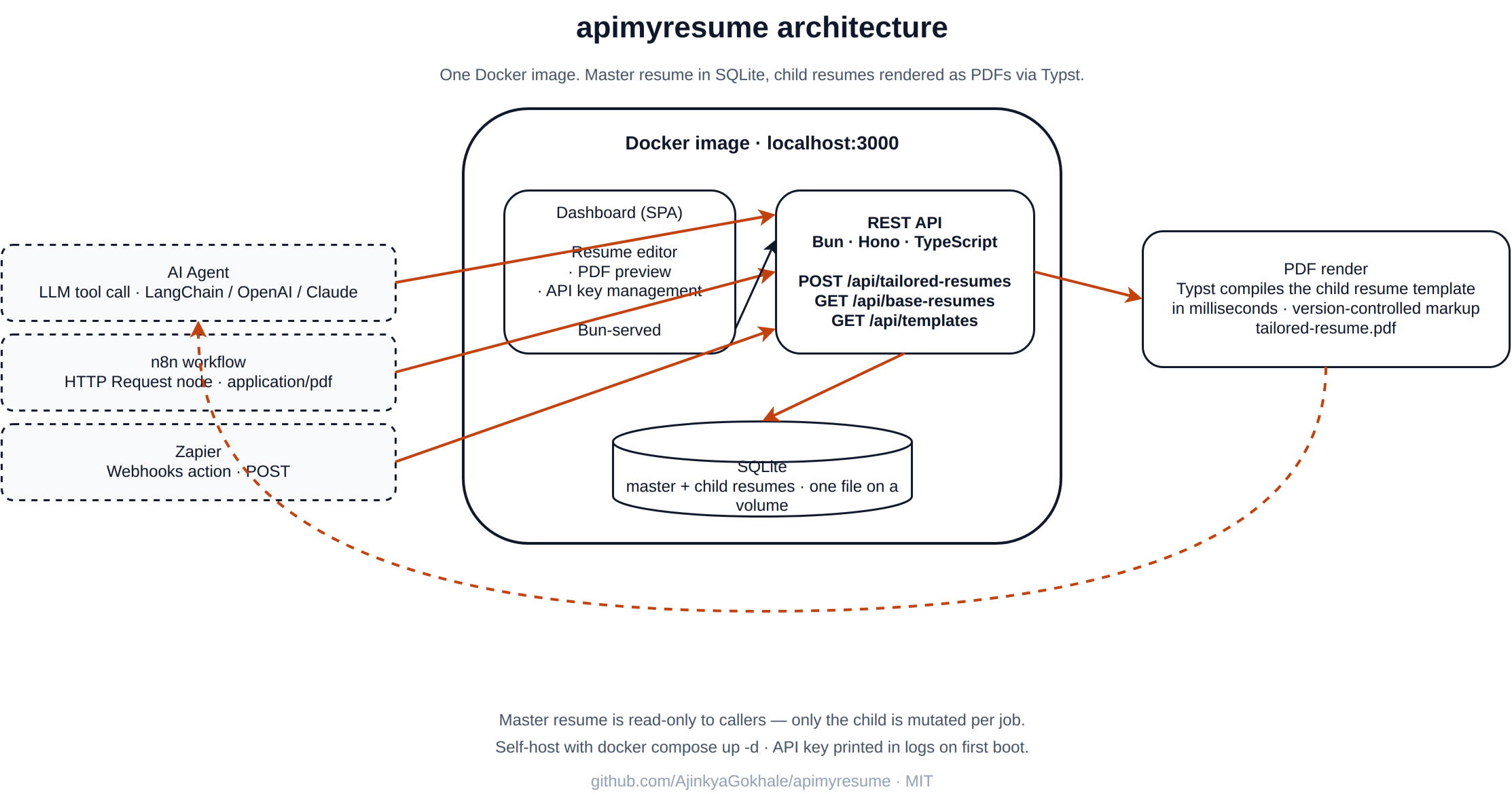
I built a thing. It’s called apimyresume.com, and it’s a self-hosted resume tailoring API: a small service that takes a master resume plus a job description and returns a job-specific PDF. The whole project is open source on GitHub, runs in a single Docker container, and is designed to be called by an AI agent — not a human.
This is what I built, why I built it, and how the moving parts fit together.
Why a resume tailoring API
Job hunting is a numbers game, but the numbers are stacked against you. You need volume — dozens of applications a month — but every applicant tracking system is reading the CV for its job’s keywords. A backend role at a fintech wants PCI-DSS, transaction integrity, and a Go-flavoured CV. A platform role at a startup wants Kubernetes, observability, and developer-experience stories. Same career arc, different emphasis.
You can hand-tailor every CV. You can subscribe to a SaaS resume builder. Or you can call an endpoint. I wanted the third option, on my own infrastructure, with my own data.
The master-and-child model
The whole API hangs on a master-and-child model. It is not a magic generator. The master resume is the source of truth, and humans — not the API — own it.
A master resume is tied to a single profile. I keep one for “Full-Stack Engineer”, one for “Cloud / Platform Engineer”, and so on. Each master is built by hand in the dashboard, with the projects, experience, and skills that profile really has. The API never invents a project, never adds a job, and never fabricates a skill. The boilerplate — same projects, same experience, same skills — is the floor.
What the API does do, for every job, is generate a child resume:
- It rewrites existing bullet points so they speak the job description’s dialect. The substance stays; the phrasing shifts.
- It injects the job’s keywords where they genuinely fit, never invented, never padding.
- It adds small, explicit signals that an applicant tracking system picks up: the right terms in the right sections, in roughly the density a real engineer would use them.
That is the entire delta. Same projects. Same experience. Same skills. New bullets, new keywords, new PDF. The master is never mutated by an automation.
What the API actually does
The dashboard is where the masters live. You open it, you create or edit a master for a given profile, and you save. That master is stored in SQLite as a structured document — the same shape that goes into the Typst template.
The API is the same shape, but the inputs come over HTTP:
- The agent (you, your n8n workflow, your LLM) reads a job description.
- It calls
POST /api/tailored-resumeswith the job description text. - The API finds the right master — by default, the only one, or whichever profile the caller picks.
- An LLM pass rewrites bullets and injects keywords from the JD. No new sections, no new projects, no invented experience.
- Typst compiles the child into a PDF, and the API returns the file.
You can call this with curl, with the n8n HTTP node, with a Python script, or by registering the API as a tool in a LangChain / OpenAI / Claude agent. The API doesn’t care who’s calling.
The interesting parts
Why Typst, not LaTeX or a headless browser
Most resume-as-PDF tools end up either shipping a headless Chromium (slow, large image, fragile layout) or shelling out to LaTeX (fast output, but the toolchain is hostile). Typst sits in the middle: it compiles in milliseconds, the templates are version-controlled markup, and the binary is small.
The layout is the real win. I can write a template that says lead with the first project, suppress the second, bold these specific skills, and only render the “Key Technologies” sidebar if the job description mentions “observability” — all in plain code, all diffable, all running in the same Docker image as the API.
Why SQLite, not Postgres
There is one writer, a small handful of readers, and a few hundred records in the heaviest realistic deployment (one resume per application for a year of job hunting). SQLite handles that with the engine off. Adding Postgres would mean another container, a connection string, migrations tooling, and a failure mode the moment DNS hiccups.
SQLite is a single file on a Docker volume. Back it up with cp. Restore it with cp. That’s the whole operational story.
Why API keys, not OAuth
This is a self-hosted tool called by agents I control. There’s no third-party login, no public sign-up, no scope negotiation. Every caller — n8n, a Python script, a LangChain tool — gets an API key created in the dashboard. The key goes in an Authorization: Bearer header, the API hashes it, looks it up, and serves the request.
If a key leaks, you delete it in the dashboard and make a new one. That’s the entire key-management UX.
Why a dashboard at all
A pure API would have been fine for me. But “self-hosted” means other people too, and “create a master resume as JSON in a config file” is a hard onboarding cliff. The dashboard exists to do exactly three things:
- Edit a profile-specific master resume in a form, not a JSON file
- Preview a child PDF before you wire the API into a workflow
- Mint and revoke API keys
Anything beyond that is scope creep.
The end-to-end call
Here’s the actual shape of an integration. From my n8n workflow, after the skill-gap agent scores a job above the cutoff, an HTTP Request node calls the API:
POST /api/tailored-resumes
Authorization: Bearer ***
Content-Type: application/json

{
  "jobDescription": "<full JD text from the LinkedIn scraper>"
}
The response is a PDF binary. The next node writes it to the application tracker in Google Drive, alongside the skill-gap report the agent already produced.
Total added nodes in the workflow: three (an IF for the score cutoff, the HTTP Request, and the Google Drive upload). The whole thing runs in a couple of seconds end-to-end.
If you’d rather call it from Python, it’s a requests.post with a Bearer header. If you’d rather call it from an LLM agent, register the API as a tool with a JSON schema for the request body and let the model fill it in. The API doesn’t know or care.
Self-hosting in one command
The whole point of “one Docker image” is that the runbook is short:
docker compose up -dThat’s it. The image includes Bun, Typst, the compiled API binary, the dashboard assets, and a fresh SQLite file. The first time it boots, it generates an admin API key and prints it to the logs:
docker compose logs api | grep "API key"Open http://localhost:3000, paste the key when prompted, create a master resume, and you’re generating tailored PDFs. For production you put it behind Caddy (or your reverse proxy of choice) for HTTPS and call it a day.
What this isn’t
It’s not an ATS-scoring tool, not a job-board aggregator, and not a replacement for an actual job application. It’s a single, well-scoped endpoint that solves one problem — turn this master resume into a job-specific PDF — and gets out of the way.
If you want a scraper, write one (or use mine). If you want a skill-gap analyzer, run an LLM agent. If you want to apply to the job, you still have to do that. This is the piece in the middle that takes the agent’s decision and produces the deliverable.
The code is open source under MIT: github.com/AjinkyaGokhale/apimyresume. Issues and PRs welcome. If you wire it into your own job-hunt pipeline, I’d love to hear what you do with it.